V-Arc for Windows

Your Digital Vault

Passwords, 2FA codes and private notes, encrypted on your own PC. V-Arc works offline and never sends your vault anywhere.

Try every feature free for 14 days No Microsoft Store? Download V-Arc-Setup.exe instead

Version 0.1.73.0 · Windows 10 and 11 (64-bit) · Updates install automatically.

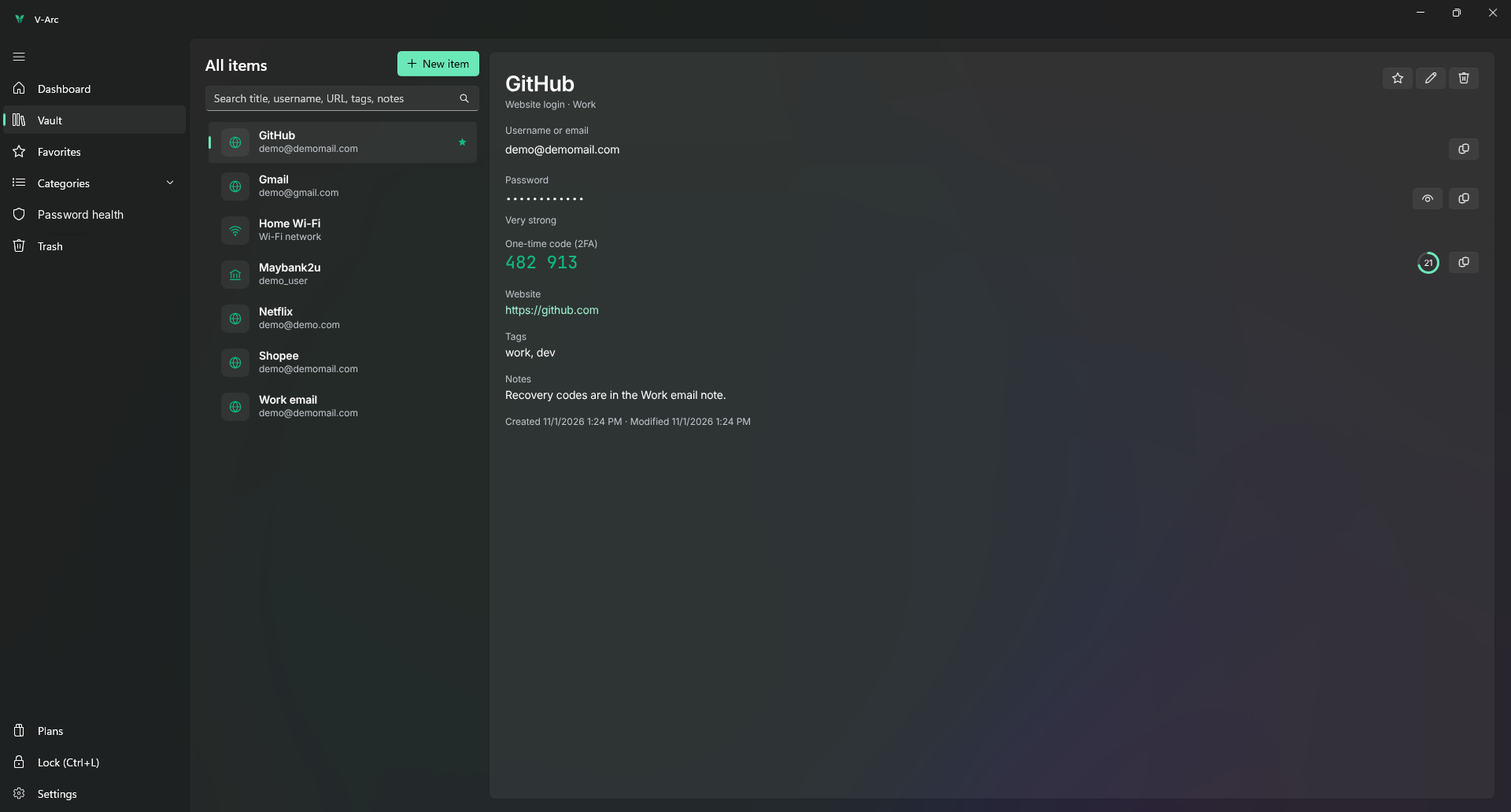
The V-Arc vault: saved logins on the left, and the selected GitHub login on the right with its live 2FA code.
Screenshot coming soon
  • AES-256 + Argon2idZero-knowledge encryption
  • Stays on your PCWorks offline, no cloud account
  • Windows HelloUnlock with your face or fingerprint
  • Made in MalaysiaBy Shahab Technology Services

See it in action

Meet Pango, your vault's guardian

Pango shows you round V-Arc in about a minute and a half: encryption, the password generator, 2FA codes, password health, Windows Hello and the plans.

Features

Everything you need to keep your accounts safe

A fast, native Windows app built for one job: keeping your secrets secret.

Your vault

All your logins, one search away

Save websites, apps, cards and Wi-Fi in one encrypted vault. Search by title, username, website, tag or note, and copy a password in one click.

  • Favourites and categories keep the important ones close
  • Copied passwords stay out of clipboard history and clear after 30 seconds
  • Deleted something by mistake? Restore it from Trash
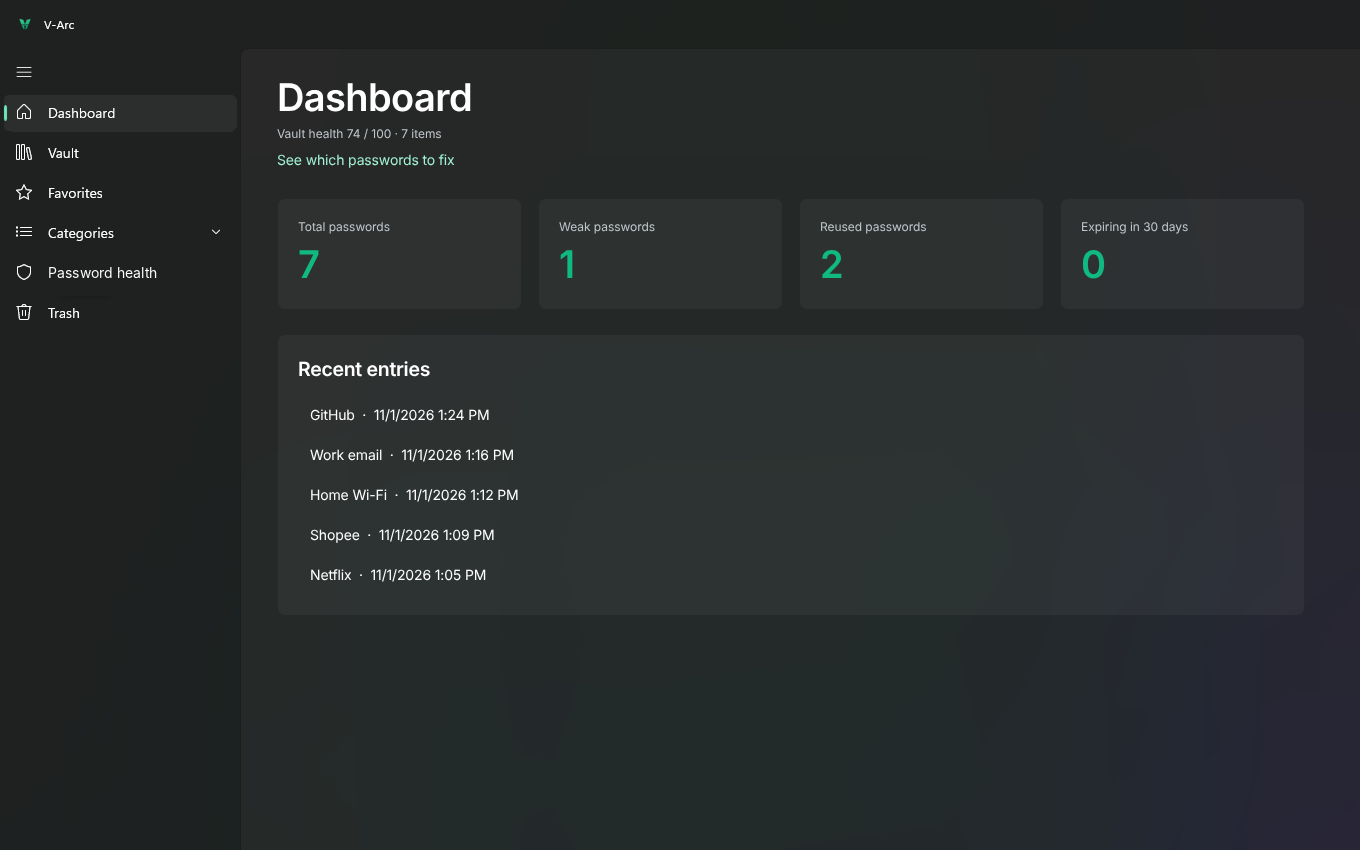
The V-Arc dashboard showing totals for saved, weak, reused and expiring passwords, with recent entries below.
Screenshot coming soon
The dashboard shows how your vault is doing at a glance.

2FA codes

Your authenticator, built in

Paste the setup key or otpauth:// link a website gives you, and V-Arc shows the current 6-digit code right next to the password. No phone to hunt for.

  • Standard TOTP codes that work with Google, Microsoft, banks and more
  • The code refreshes on its own, with a countdown
  • Copy it in one click when you sign in
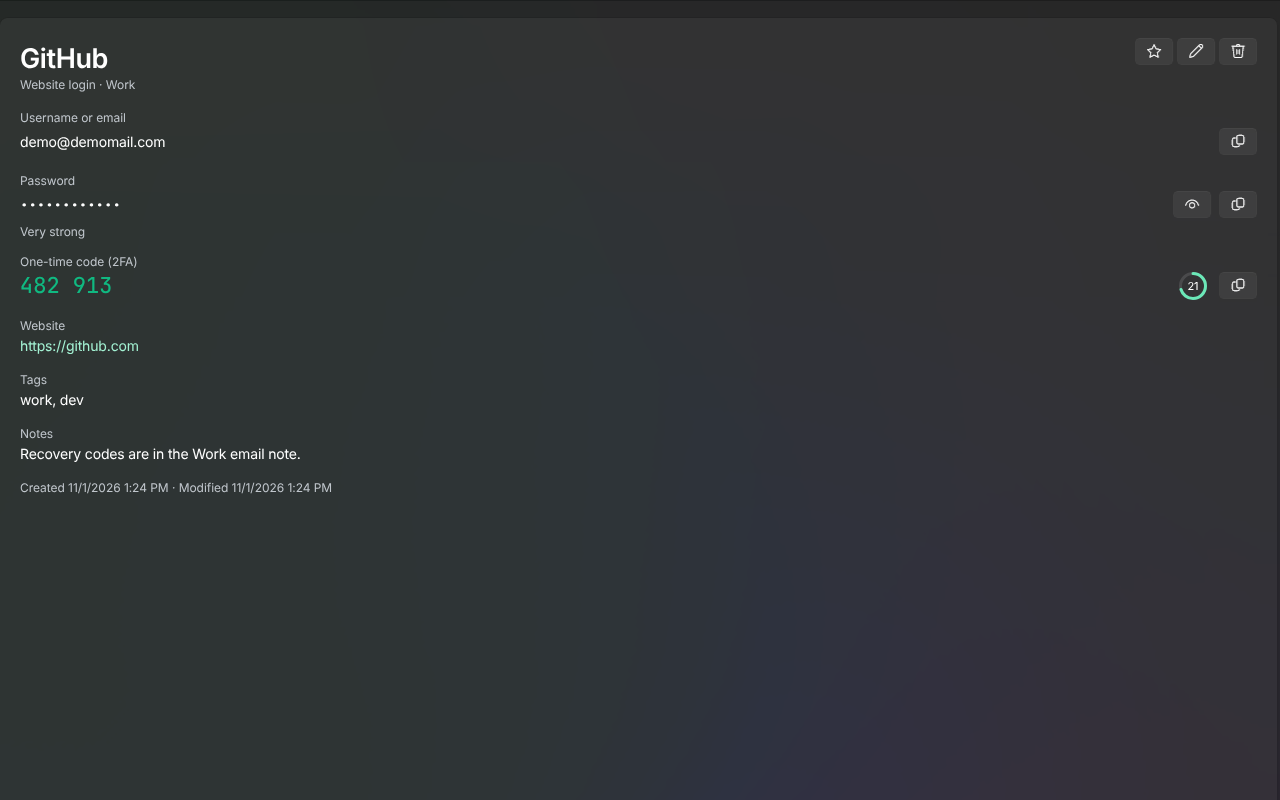
A login open in V-Arc showing its username, hidden password and a live 6-digit one-time code.
Screenshot coming soon
A login with its one-time code, ready to copy.

Password generator

Strong passwords without thinking

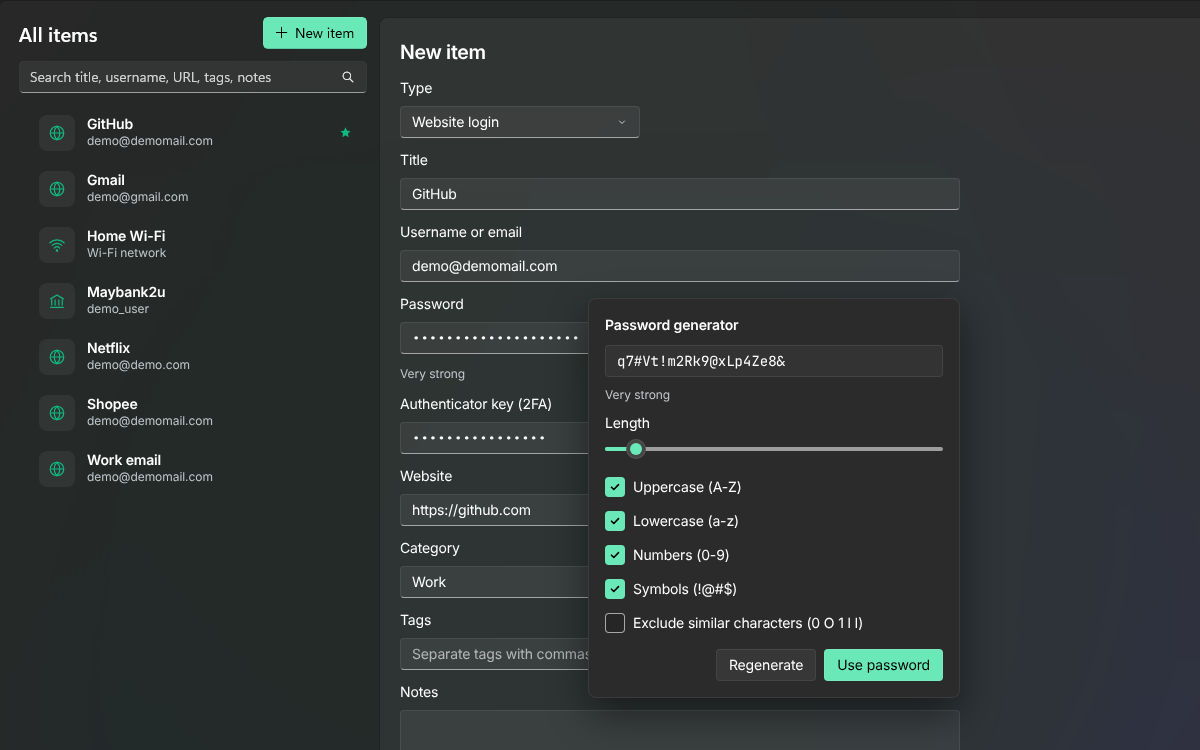
Every new login gets a long, random password made for it. Pick the length and the characters a site allows, and V-Arc does the rest.

  • Uppercase, lowercase, numbers and symbols
  • Leave out look-alike characters like 0, O, 1, l and I
  • Regenerate until you like it, then use it
The V-Arc password generator with length and character options.
Screenshot coming soon
The generator, inside the New item form.

Password health

Know which passwords to fix first

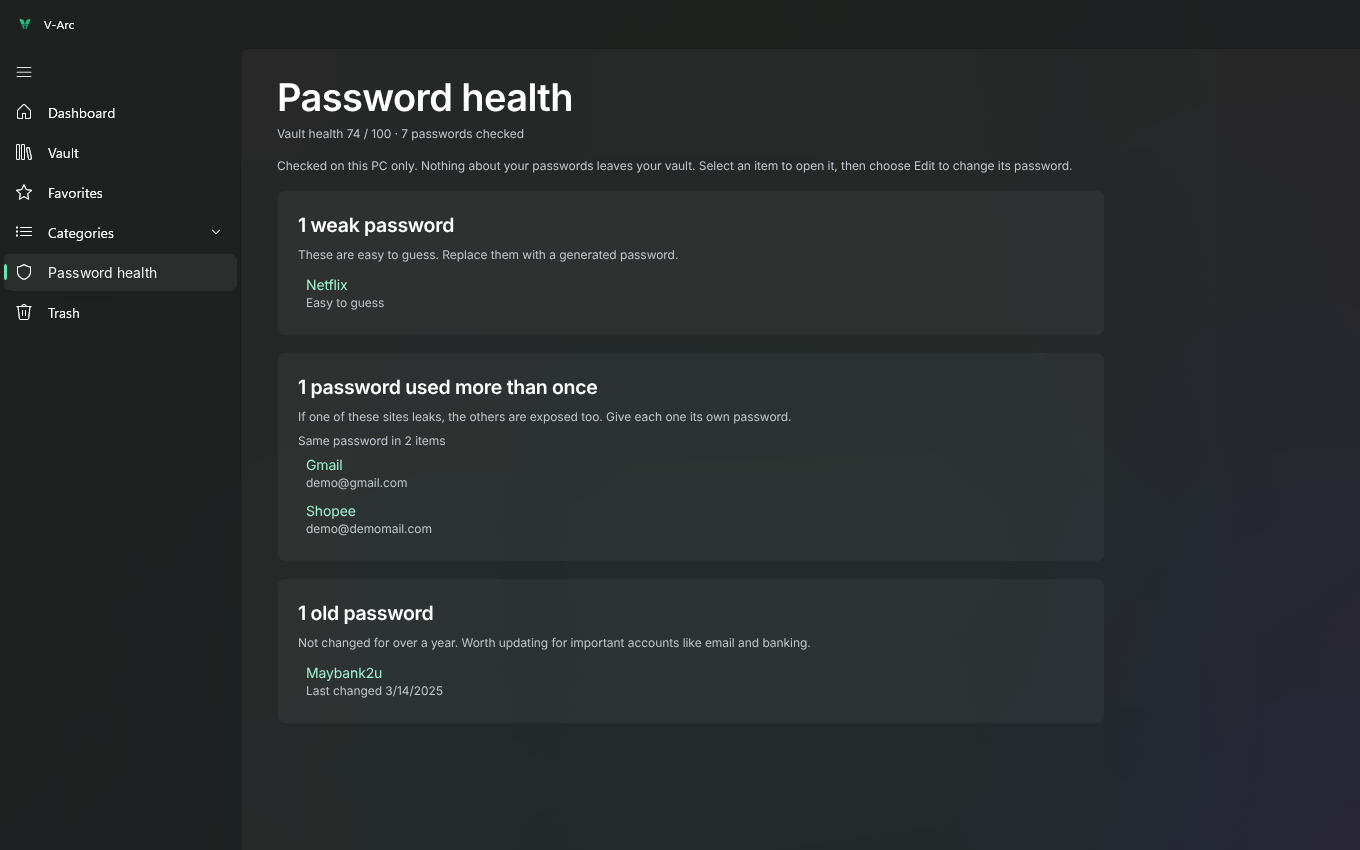
V-Arc checks your vault for weak, reused and old passwords, and for items about to expire. The check runs on your PC only, so nothing about your passwords leaves your vault.

  • Weak passwords that are easy to guess
  • Reused passwords, so one leak can't open other accounts
  • Passwords not changed for over a year, and expiring items
The V-Arc Password health page listing weak, reused and old passwords.
Screenshot coming soon
Password health groups what needs attention.

Locked tight

Only you can open it

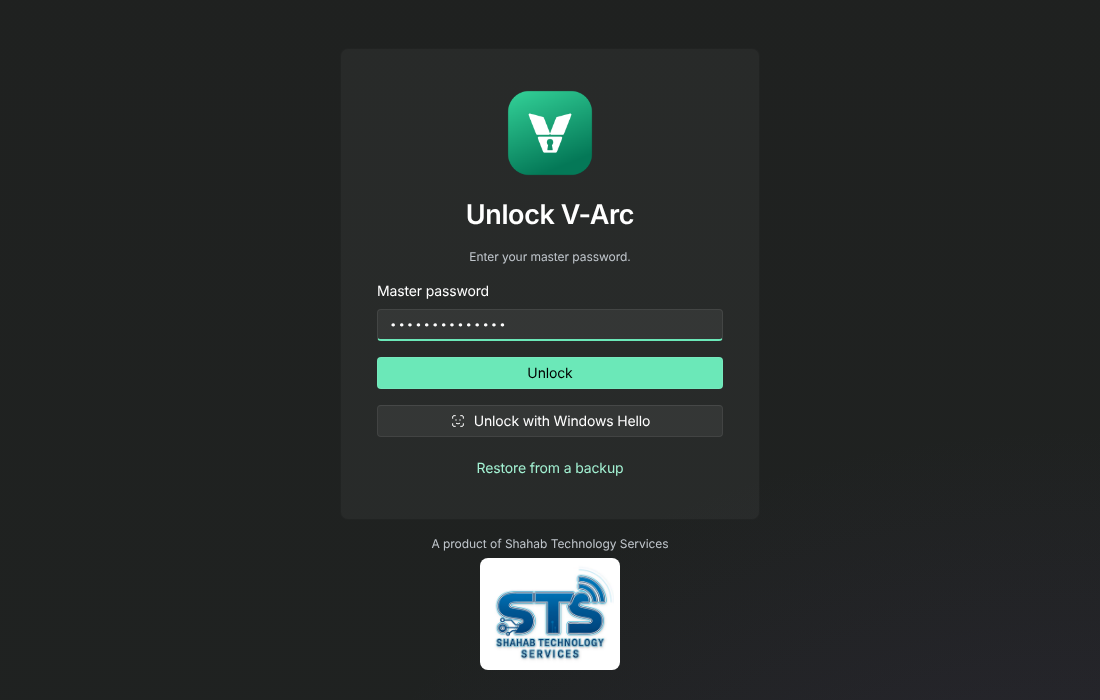
Your vault opens with a master password that only you know, or with Windows Hello on PCs that support it. We never see your master password, so nobody can open your vault but you.

  • Locks after a few minutes without use (you choose how long)
  • Locks when you press Win+L, sign out, sleep or disconnect a remote session
  • Press Ctrl+L to lock it yourself at any time
The V-Arc unlock screen asking for the master password, with an option to unlock with Windows Hello.
Screenshot coming soon
Unlock with your master password or Windows Hello.

What you can keep

A place for every kind of secret

Each item type has the fields it needs, so a bank card looks like a bank card and a Wi-Fi network looks like a Wi-Fi network.

Website logins
2FA codes
Bank cards and accounts
Wi-Fi networks
Email accounts
Social media
Software licences
Secure notes
Servers
Databases
SSH keys
API keys and tokens
OAuth apps
Cloud credentials
Certificates
.env files
Encryption keys
Webhook secrets

Blue items are developer and server secrets, included with Professional.

And more

Small things that make a big difference

Encrypted backups

Back up your vault with a password you choose, and restore it on a new PC in minutes.

Bring your passwords

Import from Bitwarden, KeePass or a CSV file. Switching takes a few clicks.

Safe copy and paste

Copied passwords are kept out of Windows clipboard history and cleared after 30 seconds.

Instant search

Find anything by title, username, website, tag or note as you type.

Light and dark

A native Windows 11 look that follows your theme, or pick one in Settings.

Automatic updates

V-Arc updates itself in the background. An update never touches your vault.

Plans

Start free, pick a plan when you're ready

Every new vault gets all features free for 14 days. No card needed.

Student

Free

for verified students

Professional

US$12

per year

Get your licence key under Licences in the STS Console, then paste it into V-Arc > Settings > Licence. If your plan ever lapses, you can still open and export everything you saved.

Install

Up and running in a minute

Windows 10 or 11, 64-bit. You need the internet to install and to check your licence. Your vault itself works offline.

From Microsoft Store Recommended

  1. Click Get it from Microsoft below. The Microsoft Store opens on V-Arc.
  2. Click Get (or Install).
  3. Click Open and create your vault.

No security warnings, and the Store keeps V-Arc up to date for you.

Direct download

  1. Download V-Arc-Setup.exe and open it.
  2. Click Install. Windows asks once for permission to trust V-Arc's signing certificate from Shahab Technology Services. Choose Yes.
  3. Click Open V-Arc and create your vault.

If Windows shows Windows protected your PC, click More info, then Run anyway. Windows shows this for apps it hasn't seen many times yet. The direct download updates itself in the background, and an update never touches your vault.

FAQ

Questions people ask

Where are my passwords stored?

In an encrypted file on your own PC. V-Arc has no cloud copy of your vault, so there's no company server holding your passwords for anyone to break into.

Does V-Arc send anything over the internet?

Only to check your licence and for updates. The licence check never includes anything from your vault. Read the details in our privacy policy.

What if I forget my master password?

Nobody can recover it, including us. That's what keeps your vault private. Write it down somewhere safe, and keep an encrypted backup so you can restore your vault if you need to.

What happens when my trial or plan ends?

Your vault becomes read-only. You can still open, copy and export everything you saved. Activate a licence to add and edit items again.

I installed V-Arc from this page. Should I switch to the Store version?

You don't need to: your copy keeps updating itself. The Store version is a separate app, so to switch, make a backup in Settings > Backup and import, install V-Arc from the Microsoft Store, choose Restore from a backup, then uninstall the old copy. Activate it with the same licence key.

Can I move my vault to a new PC?

Yes. Make an encrypted backup in Settings > Backup and import, install V-Arc on the new PC and choose Restore from a backup.

Who can use the free Student plan?

Verified students, for their own accounts. Apply through the STS Console. The Student plan may show a few sponsored messages, and your vault is never used for ads.

Take your passwords back

Get V-Arc and create your vault. Every feature is yours free for 14 days.

Version 0.1.73.0 · Windows 10 and 11 (64-bit)